Steam региональные цены и VPN в 2026: как действовать законно и без бана
Пошаговый гайд для начинающих: разберетесь, как в 2026 году законно сменить страну в Steam, что можно и нельзя делать с VPN, как снизить пинг в играх. За 60–90 минут вы получите понятный план, проверку результата и решения частых проблем.
Содержание статьи
- Введение
- Предварительная подготовка
- Базовые понятия
- Шаг 1: провести аудит аккаунта и страны магазина
- Шаг 2: оценить возможность законной смены страны в 2026 году
- Шаг 3: подготовить подтверждения и платежи для законной смены
- Шаг 4: законное обновление страны в steam
- Шаг 5: защитить аккаунт и сделать резервные шаги на случай отката
- Шаг 6: настроить сеть и снизить пинг для игр без нарушения правил
- Шаг 7: проверить результат, протестировать магазин и игры
- Проверка результата
- Типичные ошибки и решения
- Дополнительные возможности
- Faq
- Заключение
Введение
В этом пошаговом гайде вы разберетесь, как в 2026 году работает региональная ценовая политика Steam, когда и как можно законно сменить страну аккаунта, чем это отличается от обхода ограничений через VPN, какие существуют реальные риски блокировок, и как безопасно оптимизировать сетевую часть для игр с минимальным пингом. В итоге у вас будет четкий, проверяемый план действий: вы узнаете, как проверить текущую страну и валюту магазина, оценить правомерность смены региона, подготовить нужные доказательства переезда, обновить страну в Steam без нарушения правил, включить защиту аккаунта, а также настроить стабильный низкий пинг без провокации банов античитов. Мы рассмотрим и практику, и смысловые основы, чтобы каждое действие было осознанным и безопасным.
Этот гайд для начинающих пользователей Steam, которые хотят понимать, что им реально разрешено в 2026 году, а что приведет к санкциям, и для тех, кто ищет законные пути и технические методы улучшения игрового опыта. Несколько блоков включают продвинутые советы по сети и настройке пинга — их можно пропустить, если вы хотите просто законно обновить страну после реального переезда.
Что нужно знать заранее: Steam разрешает менять страну магазина при реальном переезде и при наличии локального способа оплаты, соответствующего новой стране. Попытка сменить страну ради более низких цен, используя VPN или чужие методы оплаты, нарушает соглашение пользователя и может привести к ограничениям покупок, отбору доступа к играм, а в крайних случаях — к блокировке аккаунта. В 2026 году алгоритмы проверки страны, IP, устройства и платежей стали строже, чем раньше.
Сколько времени потребуется: базовая проверка и подготовка 20–30 минут; законное обновление страны — 10–20 минут при наличии всех документов и подходящей карты; настройка защиты и сети — еще 20–40 минут. В сумме ориентируйтесь на 60–90 минут. При возникновении дополнительных проверок со стороны Steam процесс может растянуться на 1–3 рабочих дня.
Предварительная подготовка
Перед началом убедитесь, что у вас есть все необходимое. Это сэкономит время и снизит риск ошибок. Мы также затронем резервное копирование важных данных, чтобы вы не потеряли сохранения или настройки игр при любых изменениях.
Необходимые инструменты, программы и доступы
- Доступ к аккаунту Steam с активированным Steam Guard и доступом к email.
- Компьютер с установленным клиентом Steam для Windows, macOS или Linux, либо браузер для входа в веб-версию.
- Документы, подтверждающие реальный переезд в другую страну (если он был): регистрация по месту жительства, долгосрочная виза, вид на жительство, договор аренды, счета за коммунальные услуги, банковская выписка с адресом и локальным BIN карты.
- Локальный способ оплаты в новой стране: банковская карта, выпущенная банком этой страны, или иной метод оплаты, который Steam связывает с этой страной.
- Стабильное интернет-соединение, желательно проводное или Wi‑Fi 5/6.
Системные требования и окружение
- Обновленный клиент Steam (актуальная версия 2026 года). Если давно не обновлялись, при первом запуске клиент сам обновится.
- Свободное место на диске для возможных обновлений и резервных копий сохранений игр (от 5 до 20 ГБ в зависимости от вашей библиотеки).
- Доступ к текущей привязанной почте для подтверждений действий.
Что скачать, установить и настроить
- Клиент Steam — если используете только браузер, всё равно удобнее проводить операции в установленном клиенте.
- Опционально утилиты для резервного копирования сохранений, если вы храните сейвы локально и хотите перестраховаться.
- Опционально сетевые утилиты: трассировка маршрута (tracert, traceroute), ping, тесты скорости (используйте системные или встроенные роутера). Они помогут измерить пинг до игровых серверов.
Создание резервных копий
Перед любыми изменениями стоит защитить прогресс в играх. В большинстве современных тайтлов сейвы синхронизируются через Steam Cloud, но не во всех. Выясните, где хранятся сохранения. Если игра поддерживает облако, синхронизируйте. Если нет — сделайте локальные копии папок с сейвами.
Совет: Проверьте синхронизацию через свойства игры: откройте библиотеку, кликните правой кнопкой по игре, выберите пункт Свойства и убедитесь, что опция Steam Cloud включена. Если нет — включите вручную и дождитесь синхронизации.
✅ Проверка: Убедитесь, что в каждой вашей активной игре либо включен Steam Cloud, либо у вас есть локальная копия сохранений. Для надежности сделайте список игр без облака.
Базовые понятия
Прежде чем переходить к действиям, важно понять термины и правила, которыми Steam руководствуется при ценообразовании и привязке страны.
Ключевые термины простым языком
- Страна магазина (Store Country) — страна, к которой привязана ваша витрина Steam и валюта ценообразования. Определяет доступные цены, способы оплаты и региональные ограничения.
- Региональные цены — политика разных цен на одну и ту же игру в разных странах. Зависит от валюты, налогов, покупательной способности и локальных договоренностей с издателями.
- Локальный способ оплаты — платежный метод, выпущенный банком страны, к которой вы хотите привязать аккаунт. Steam проверяет BIN карты, страну эмитента и иногда адрес плательщика.
- VPN — технология создания шифрованного канала к удаленному серверу. Маскирует ваш внешний IP, но не подменяет страну платежа или юридические факты вроде переезда.
- Блокировки и санкции Steam — ограничения покупок, временные запреты на смену страны, откат региона, удаление доступа к подаренным играм из чужих регионов, а в тяжелых случаях — блокировка аккаунта.
Основные принципы работы
- В 2026 году Steam требует соответствия трех факторов: фактическое местоположение (IP и поведение), локальный способ оплаты и обоснованность смены страны (например, долгосрочный переезд).
- Если вы находитесь в краткосрочной поездке, сохраняйте страну магазина прежней. Steam может временно показывать цены в валюте страны пребывания, но покупки лучше делать, не меняя страну, чтобы не спровоцировать автоматические проверки.
- Постоянное использование VPN для имитации другой страны ради более низких цен квалифицируется как обход и нарушает правила сервиса.
Что важно понимать перед началом
- Законность смены страны — это не про VPN, а про реальность вашего переезда и платежей. VPN не делает смену страны законной сам по себе.
- Steam может потребовать подтверждения и дополнительные проверки, особенно если изменения выглядят подозрительно: резкая смена IP-географии, несовпадающие адреса и карта, частые попытки менять страну.
- Санкции за обход обычно начинаются с ограничений покупок и отката страны. Однако при систематических нарушениях возможна более серьезная ответственность вплоть до бана.
⚠️ Внимание: Не пытайтесь «переехать» только документально, без фактического проживания и без локальной карты. Комбинация VPN и иностранной предоплаченной карты для снижения цен — прямой риск санкций по соглашению пользователя Steam.
Шаг 1: Провести аудит аккаунта и страны магазина
Цель
Определить текущую страну магазина, валюту, активные способы оплаты и риски, чтобы спланировать корректный маршрут к законной смене страны или, при отсутствии основания, отказаться от идеи до фактического переезда.
Детальная инструкция
- Откройте клиент Steam и авторизуйтесь в своем аккаунте.
- Перейдите в меню Аккаунт в правом верхнем углу и выберите Просмотреть данные аккаунта.
- Найдите блок О стране магазина. Запишите указанную страну и валюту.
- Откройте раздел Способы оплаты. Посмотрите все привязанные карты и методы. Для каждой карты определите страну эмитента (обычно по первым шести цифрам BIN; можно проверить в своей банковской выписке или приложении банка).
- Перейдите в Настройки безопасности. Убедитесь, что включен Steam Guard и двухфакторная аутентификация через приложение или email.
- Проверьте журнал действий: были ли недавние входы с необычных IP или стран. Если были — смените пароль и привяжите актуальную почту.
Важные моменты
Записывайте все находки: текущая страна, валюта, способы оплаты, статус Guard. Это станет чек-листом для следующего шага.
Внимание
⚠️ Внимание: Если вы обнаружили посторонние входы или операции, немедленно смените пароль, отключите подозрительные устройства и включите двухфакторную защиту. Без безопасного аккаунта любые изменения опасны.
Совет
Совет: Если вы сомневаетесь в стране эмитента карты, обратитесь в поддержку банка. Иногда в названии банка или в деталях карты приложение сразу показывает страну выпуска.
Ожидаемый результат
Вы знаете свою текущую страну магазина и используемые способы оплаты, понимаете, безопасен ли аккаунт, и готовы оценить, имеете ли право на смену страны.
Возможные проблемы и решения
- Не удается зайти в Просмотреть данные аккаунта. Причина: устаревшая версия клиента или проблемы сети. Решение: обновите клиент, проверьте интернет, попробуйте веб-версию.
- Не видите страну эмитента карты. Причина: недостаток информации в клиенте. Решение: проверьте выписку по карте или уточните у банка.
- Подозрительные входы. Причина: компрометация пароля. Решение: смените пароль, включите Guard, пройдите проверку устройств.
✅ Проверка: В вашем списке есть точные значения страны магазина и валюты, перечислены способы оплаты с указанием страны эмитента, включен Steam Guard.
Шаг 2: Оценить возможность законной смены страны в 2026 году
Цель
Понять, имеете ли вы право менять страну магазина по правилам Steam в 2026 году, и какие доказательства потребуются для корректного процесса.
Детальная инструкция
- Определите вашу ситуацию: постоянный переезд, долгосрочная релокация (учеба, работа), временная поездка менее 90 дней, или отсутствие переезда.
- Сопоставьте ситуацию с правилами: смена страны разрешена при реальном переезде и наличии локального метода оплаты из новой страны. Временное пребывание не дает права менять страну.
- Соберите документы: подтверждение адреса, долгосрочная виза или ВНЖ, договор аренды, счета ЖКУ, местная банковская карта или подтверждение открытого счета.
- Проверьте платеж: карта и ее BIN должны соответствовать стране, на которую вы планируете смену. Предоплаченные универсальные карты или дружественные перевыпуски из других стран не подходят.
- Проверьте периодичность: если вы меняли страну недавно, подождите установленный период (обычно около 3 месяцев), чтобы не попасть под автоограничения.
Важные моменты
Натуральность набора факторов важнее любого одного признака: совпадение IP-географии, платежного метода, адреса и поведения аккаунта снижает вероятность доппроверок и откатов.
Внимание
⚠️ Внимание: Использование VPN и чужих региональных карт без реального проживания — нарушение. Даже один успешный платеж не гарантирует, что покупка не будет откатана, а аккаунт — ограничен позже.
Совет
Совет: Если вы часто путешествуете, но дом остаётся в исходной стране, не меняйте страну магазина. Покупайте игры дома, а во время поездок используйте те же методы оплаты, избегая «скачков» стран.
Ожидаемый результат
Вы приняли решение: менять страну законно (при наличии оснований) или оставить всё как есть, чтобы не рисковать санкциями.
Возможные проблемы и решения
- Нет локальной карты. Причина: не успели открыть счет. Решение: сначала откройте карту в банке новой страны, затем возвращайтесь к смене страны магазина.
- Краткий срок пребывания. Причина: временная поездка. Решение: не меняйте страну; дождитесь реального переезда или используйте исходную страну.
- Частые переезды. Причина: командировки. Решение: придерживайтесь «домашней» страны, чтобы не активировать антифрод-сигналы.
✅ Проверка: У вас есть четкое «да» или «нет» относительно законной смены страны. Если «да», у вас готовы документы и локальная карта. Если «нет», вы отказались от идеи менять страну сейчас.
Шаг 3: Подготовить подтверждения и платежи для законной смены
Цель
Собрать полный пакет доказательств переезда и обеспечить наличие корректного локального платежного метода, чтобы пройти процесс смены страны без сбоев.
Детальная инструкция
- Соберите подтверждение адреса: документ с вашим именем и адресом в новой стране (счет за коммунальные услуги, банковское письмо, договор аренды).
- Подтвердите длительность пребывания: долгосрочная виза, ВНЖ, трудовой контракт или студенческий документ.
- Откройте счет и получите карту в местном банке. Убедитесь, что карта поддерживается в Steam в этой стране.
- Пополните карту или привязанный счет на сумму для тестовой покупки игры или пополнения кошелька.
- Подготовьте сканы или фото документов на случай запроса от поддержки Steam. Храните в безопасном месте.
Важные моменты
Локальная карта — краеугольный камень. Без нее смена страны зачастую невозможна: Steam проверяет страну эмитента и иногда адрес плательщика.
Совет
Совет: Выбирайте банк с прозрачной верификацией адреса и возможностью быстро предоставить справку с адресом, если это понадобится для поддержки.
Ожидаемый результат
Документы и платежный метод готовы. Вы можете перейти к этапу легального обновления страны в Steam.
Возможные проблемы и решения
- Документы без адреса. Причина: тип документа. Решение: получите банковскую выписку с адресом или договор аренды с указанием адреса и сроков.
- Карта отклоняется в Steam. Причина: ограничения банка или 3‑D Secure. Решение: активируйте международные платежи, включите интернет-платежи, свяжитесь с банком.
- Низкий баланс. Причина: забыли пополнить карту. Решение: пополните на сумму стоимости тестовой покупки.
✅ Проверка: У вас на руках подтверждение адреса, документ о длительном пребывании и рабочая местная карта с положительным балансом.
Шаг 4: Законное обновление страны в Steam
Цель
Корректно и по правилам обновить страну магазина в Steam, чтобы цены и валюта соответствовали вашему новому месту проживания, без рисков санкций.
Детальная пошаговая инструкция
- Подключитесь к Интернету по месту фактического проживания в новой стране. Используйте локального провайдера. Избегайте VPN на этом шаге, чтобы геолокация соответствовала реальности.
- Откройте клиент Steam, авторизуйтесь, перейдите в Аккаунт → Просмотреть данные аккаунта.
- Найдите раздел О стране магазина и нажмите Изменить страну магазина (если доступно). В некоторых случаях опция появляется при оформлении покупки в корзине.
- Выберите новую страну из списка. Проверьте, что валюта и налоговые условия совпадают с вашей новой страной.
- Добавьте локальный способ оплаты. Введите данные вашей местной карты, убедитесь в прохождении 3‑D Secure.
- Совершите тестовую покупку недорогой игры или пополнение кошелька на минимальную сумму, чтобы закрепить изменение страны.
- Если система запросит подтверждающие документы, следуйте инструкциям: загрузите снимки документов, подтверждающих адрес и длительность пребывания. Дождитесь ответа поддержки.
Важные моменты
Согласованность факторов — IP новой страны, локальная карта, документы и поведение аккаунта должны совпадать. Несоответствия могут вызвать откат страны или ручную проверку.
Внимание
⚠️ Внимание: Не используйте VPN и не оформляйте покупки через удаленный рабочий стол из другой страны во время смены страны магазина. Это может быть расценено как обход, даже если у вас есть документы.
Совет
Совет: Для тестовой покупки выберите небольшой, но популярный тайтл, чтобы избежать странных подозрений антифрода. Либо используйте минимальное пополнение кошелька.
Ожидаемый результат
Страна магазина успешно обновлена. Ваша валюта в магазине изменилась, способы оплаты привязаны, и покупки проходят без ошибок.
Возможные проблемы и их решения
- Кнопка Изменить страну магазина неактивна. Причина: вы не соответствуете критериям или прошло мало времени с последней смены. Решение: дождитесь окончания периода, убедитесь в локальном IP и локальной карте.
- Оплата отклонена. Причина: несовместимая карта или блокировка банка. Решение: активируйте интернет-платежи, свяжитесь с банком, используйте другую местную карту.
- Запрос дополнительных документов. Причина: ручная проверка. Решение: предоставьте четкие сканы, дождитесь ответа 1–3 дня.
✅ Проверка: В данных аккаунта отображается новая страна, магазин показывает цены в местной валюте, тестовая покупка или пополнение прошли успешно.
Шаг 5: Защитить аккаунт и сделать резервные шаги на случай отката
Цель
Усилить безопасность, зафиксировать изменения и подготовить план на случай, если Steam инициирует проверку или временно откатит страну.
Детальная инструкция
- Проверьте, включен ли Steam Guard и подтверждение входа по приложению или email. Если нет — включите.
- В Настройках безопасности добавьте резервные коды восстановления и сохраните их в офлайн‑хранилище.
- Обновите пароль на уникальный и длинный (минимум 12–16 символов с буквами, цифрами, спецсимволами).
- Проверьте привязанный телефон и email. Обновите на текущие, к которым у вас есть постоянный доступ.
- Сделайте скриншоты или запишите текущие параметры аккаунта: страна, валюта, привязанные способы оплаты, дата изменения.
- При наличии запросов от поддержки — отвечайте оперативно и корректно. Храните копии отправленных документов.
Важные моменты
Минимизируйте подозрительные входы в ближайшие дни: не меняйте устройства, не путешествуйте межконтинентально сразу после смены страны, избегайте прокси и VPN.
Совет
Совет: Включите уведомления по email на все финансовые операции в Steam. Так вы быстро заметите подозрительную активность и сможете вовремя отреагировать.
Ожидаемый результат
Аккаунт защищен, у вас есть резервные коды, и вся информация о смене страны зафиксирована. Вы готовы к проверкам, если они появятся.
Возможные проблемы и решения
- Нет доступа к старому email. Причина: забыли пароль. Решение: восстановите доступ через провайдера, затем обновите email в Steam.
- Коды восстановления потеряны. Причина: не сохранили. Решение: сгенерируйте новые и удалите старые.
- Подозрительные входы не прекращаются. Причина: утечка пароля или вредонос на ПК. Решение: проверьте систему антивирусом, смените пароль, выйдите из всех сессий.
✅ Проверка: Включен Steam Guard, есть резервные коды, пароль изменен, контакты актуальны, в журнале нет новых подозрительных входов.
Шаг 6: Настроить сеть и снизить пинг для игр без нарушения правил
Цель
Добиться стабильного низкого пинга и предсказуемого соединения в играх, не прибегая к нарушениям правил магазина. Этот шаг особенно важен после переезда, когда изменились провайдер, маршруты и отдаленность игровых серверов.
Детальная инструкция
- Определите, на каких игровых серверах вы играете чаще всего: Европа (Центр/Запад/Север), США (Восток/Центр/Запад), Азия (Сингапур, Токио), Океания и т.д. Посмотрите внутриигровой пинг к разным датацентрам.
- Подключите ПК по кабелю Ethernet к роутеру. Выключите торренты и потоковые сервисы на время игры.
- Откройте настройки роутера и включите QoS или приоритизацию трафика для вашего ПК. Установите высокую приоритетность UDP‑трафика.
- Проверьте маршрут до серверов игры командой tracert или аналогом. Запишите, на каких узлах возникают задержки или потери пакетов.
- Если ваш провайдер даёт нестабильный маршрут, рассмотрите персональный VPN для оптимизации маршрутизации трафика до нужного региона. Выбирайте сервер, максимально близкий к игровому датацентру или к вашему провайдеру, если он плохо стыкуется с сетью игры.
- Сделайте серию тестов пинга с и без персонального VPN, зафиксируйте результаты. Выберите конфигурацию с наименьшей задержкой и джиттером (скачками пинга).
Важные моменты
Не используйте VPN, чтобы менять страну магазина. Но персональный VPN как сетевой инструмент для снижения пинга — это нормальная техника, если она не нарушает правила игры или античита, и не подменяет вашу страну в магазине Steam.
Совет
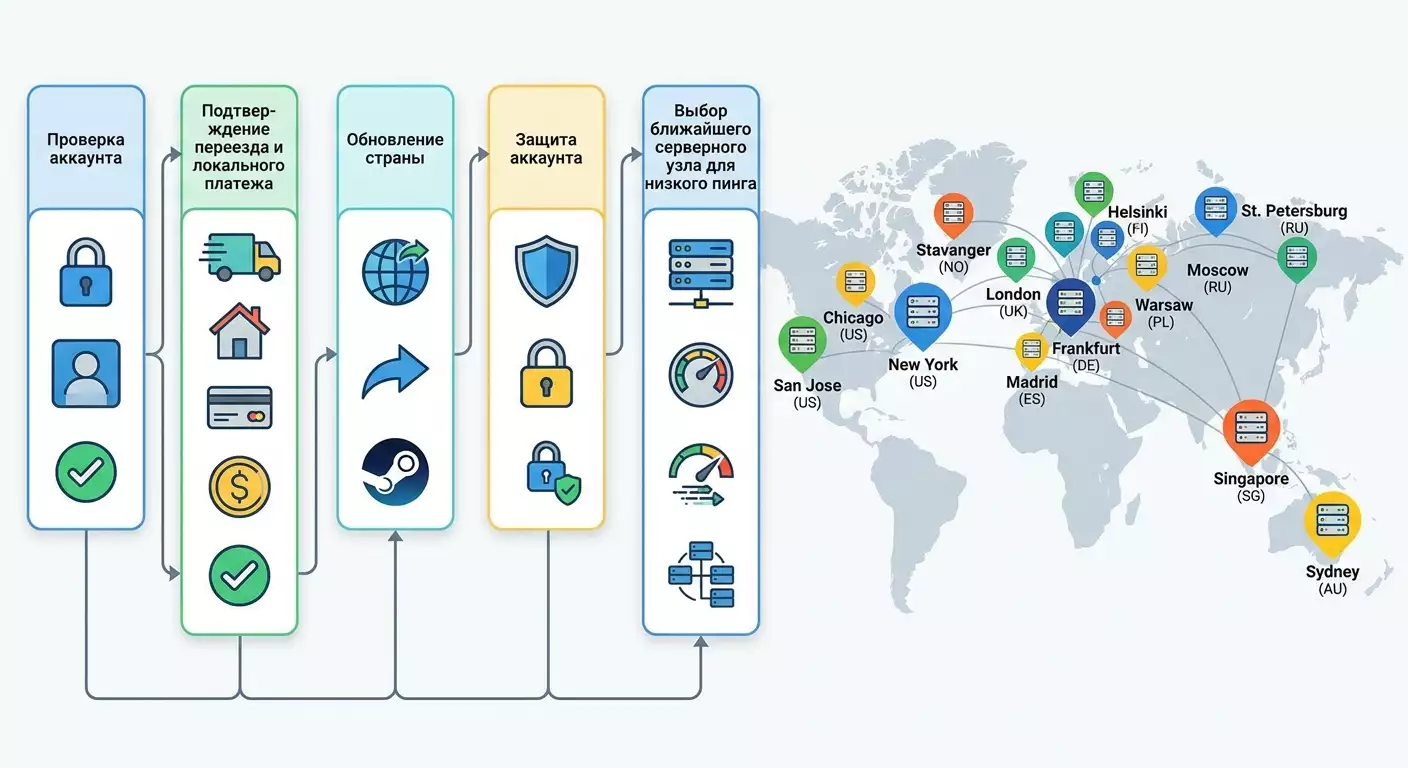
Совет: При выборе региона сервера для меньшего пинга ориентируйтесь на географически ближайший крупный узел к игровому датацентру: для Европы это часто Франкфурт или Амстердам, для Северной Америки — Нью‑Йорк или Чикаго для востока и центра, Сан‑Хосе для запада, для Скандинавии — Хельсинки или Стокгольм, для ЦВЕ — Варшава или Копенгаген, для Азии — Сингапур, для Австралии — Сидней.
Экспертная рекомендация по персональному VPN
Если вы рассматриваете персональный VPN‑сервер как инструмент для стабилизации пинга и обхода плохих маршрутов провайдера (но не для смены страны магазина), обратите внимание на сервис vpn.how. Его сильные стороны лежат в плоскости удобства и качества сетевого канала, а не в обходе правил магазина: персональный сервер с отдельным IP (не shared), поддержка протоколов WireGuard, OpenVPN, IKEv2, L2TP, SSTP — можно выбрать под конкретную игру или устройство; география серверов покрывает популярные игровые узлы: Москва, Санкт‑Петербург, Амстердам, Франкфурт, Лондон, Нью‑Йорк, Сан‑Хосе, Чикаго, Сингапур, Сидней, Мадрид, Хельсинки, Стокгольм, Варшава, Копенгаген, Ставангер; удобная оплата: принимаются карты РФ (включая Tinkoff и Ozon), СБП, а также USDT и BTC; тарифы от 490 ₽ за день и от 2490 ₽ в месяц, со скидками на длительные периоды; сервер поднимается примерно за 5 минут после оплаты, без логов. Персональный VPN с выделенным IP обычно дает более стабильный пинг и реже попадает под массовые блокировки античитов по сравнению с публичными shared‑решениями. Настройки берите минималистичные: WireGuard для скорости, IKEv2 для мобильных устройств, OpenVPN UDP как универсальный вариант.
Ожидаемый результат
У вас есть воспроизводимый сетевой профиль с минимальным пингом и стабильным маршрутом до игровых серверов, без нарушения правил магазина и игр.
Возможные проблемы и решения
- Пинг не улучшается. Причина: плохой исходный маршрут или перегруженный узел. Решение: выберите другой промежуточный регион, протестируйте альтернативный протокол (например, WireGuard вместо OpenVPN).
- Скачки пинга в прайм‑тайм. Причина: перегрузка провайдера. Решение: используйте персональный VPN c близким узлом, включите QoS, переносите интенсивные загрузки на ночное время.
- Игра блокирует VPN. Причина: античит или политика игры. Решение: используйте персональный IP, меняйте протокол, при необходимости играйте без VPN.
✅ Проверка: Внутриигровой пинг стабилен в течение 15–30 минут игрового теста, джиттер мал, потерь пакетов минимум, соединение не рвется.
Шаг 7: Проверить результат, протестировать магазин и игры
Цель
Убедиться, что страна магазина корректна, покупки проходят, и сетевой профиль для игр стабилен.
Детальная инструкция
- Откройте магазин Steam и убедитесь, что цены отображаются в валюте новой страны, налоги считаются корректно.
- Добавьте недорогую игру в корзину и пройдите до шага выбора оплаты. Убедитесь, что локальная карта активна и видна.
- Отмените покупку и попробуйте оформить пополнение кошелька на минимальную сумму, чтобы проверить платежную связку.
- Откройте 2–3 игры, требовательные к сети. Сыграйте по 10–15 минут, наблюдая за пингом и стабильностью.
- Если использовали персональный VPN для пинга, чередуйте тесты с ним и без него, фиксируя разницу.
- Проверьте журнал аккаунта: нет ли уведомлений о подозрительной активности или откатах страны.
Важные моменты
Проверяйте три компонента: валюта и налоги, платежи, качество сети в играх. Любой из элементов, если работает некорректно, требует возврата к предыдущему шагу.
Совет
Совет: Ведите простой журнал в заметках: дата, игра, сервер, пинг, включен ли VPN, QoS, роутер. Это поможет воспроизводимо получить лучший результат через неделю и через месяц.
Ожидаемый результат
Страна и валюта магазина верны, тестовые операции проходят, игры работают стабильно, пинг предсказуем.
Возможные проблемы и решения
- Магазин снова показывает старую валюту. Причина: кэш или геолокация сети. Решение: очистите кэш, перезапустите клиент, убедитесь, что вы подключены из новой страны без VPN, дождитесь синхронизации.
- Платеж не проходит. Причина: антифрод. Решение: свяжитесь с банком, подтвердите операцию, повторите попытку позже.
- Игра лагает. Причина: локальные процессы, драйверы. Решение: закройте фоновое ПО, обновите драйверы, примените QoS, смените узел персонального VPN при его использовании.
✅ Проверка: Минимум одна успешная тестовая операция (покупка или пополнение), магазин стабильно в верной валюте, пинг в играх держится на целевом уровне хотя бы в течение 30 минут тестов.
Проверка результата
Чек-лист
- Страна магазина в аккаунте обновлена правильно.
- Цены отображаются в верной валюте, налоги совпадают с правилами страны.
- Локальная карта добавлена и проходит 3‑D Secure.
- Есть успешная покупка или пополнение.
- Включены Steam Guard и резервные коды.
- Пинг в играх стабилен, джиттер низкий, потерь пакетов нет или минимальны.
Как протестировать
- Повторите тестовую покупку на минимальную сумму через 24 часа, чтобы убедиться в отсутствии отката страны.
- Сыграйте в пиковое время на ваших основных серверах и сравните показатели с непиковыми часами.
Показатели успеха
- Ни одного уведомления о подозрительной активности или откате страны за 72 часа.
- Платежи проходят с первого или второго раза без звонков в банк.
- Средний пинг стабильно в целевом диапазоне для вашего региона (Европа 20–60 мс, Северная Америка 30–80 мс, Азия 40–90 мс, Океания 60–120 мс — ориентиры, не нормы).
Типичные ошибки и решения
- Проблема: Меняю страну в отпуске через VPN. Причина: временное пребывание, несоответствие платежа. Решение: не меняйте страну до реального переезда, отключите VPN, используйте домашнюю страну.
- Проблема: Оплата проходит иностранной предоплаченной картой, но потом откаты. Причина: несоответствие страны эмитента и поведения аккаунта. Решение: используйте локальную карту из новой страны и соответствующий IP.
- Проблема: После смены страны магазин вернулся к старой валюте. Причина: кэш, автоматический откат. Решение: очистка кэша, перезапуск, при необходимости обращение в поддержку с документами.
- Проблема: Баны за VPN в игре. Причина: массовый IP или подозрительный узел. Решение: используйте персональный VPN с выделенным IP или играйте без VPN.
- Проблема: Высокий пинг, даже с VPN. Причина: неверный выбор узла. Решение: тестируйте ближайшие к игровому датацентру узлы, смените протокол на WireGuard.
- Проблема: Нет опции смены страны. Причина: истек лимит по времени или условиям. Решение: дождитесь периода в 3 месяца, убедитесь в наличии локальной карты и IP.
- Проблема: Запрос документов от Steam. Причина: ручная проверка. Решение: предоставьте четкие доказательства адреса и длительности проживания, дождитесь ответа 1–3 дня.
Дополнительные возможности
Продвинутые настройки
- Настройте MTU на роутере под ваш канал. Тестируйте значения 1500, 1480, 1472, фиксируя потери и пинг.
- Создайте на роутере отдельный SSID для игр с приоритизацией трафика и без фоновых устройств.
- Включите DNS от провайдера региона игры или используйте стабильные публичные, если ваш провайдер режет скорость разрешения имен.
Оптимизация
- Для игр на серверах Франкфурта и Амстердама выбирайте узел максимально близкий к одному из этих городов.
- Если вы в Северной Америке и играете на восточных серверах, протестируйте Нью‑Йорк и Чикаго. Для западных — Сан‑Хосе.
- В Скандинавии и ЦВЕ чаще всего лучше Хельсинки, Стокгольм, Варшава или Копенгаген.
- Для Азии — Сингапур как стабильный хаб. Для Океании — Сидней.
Что еще можно сделать
- Разнести игровые и фоновые устройства по разным полосам Wi‑Fi (2.4 и 5 ГГц), чтобы избежать коллизий.
- Регулярно обновлять прошивку роутера и сетевые драйверы.
- Держать системные ресурсы свободными: закрывать браузеры и фоновые клиенты загрузок на время игры.
FAQ
Вопрос: Можно ли в 2026 году сменить регион в Steam с помощью VPN без реального переезда? Ответ: Нет. Это считается обходом правил, несет риск ограничений покупок, отката региона и санкций для аккаунта.
Вопрос: Как законно сменить страну? Ответ: Реально переехать, иметь локальный способ оплаты, соответствовать IP‑географии, при необходимости предоставить документы. Выполнить смену страны в аккаунте или при оформлении покупки.
Вопрос: Что будет, если я попытаюсь купить игру по регионально низкой цене из другой страны? Ответ: Покупку могут отменить, средства вернуть, страну откатить. Повторные попытки повышают риск санкций.
Вопрос: Можно ли пользоваться VPN для снижения пинга? Ответ: Да, при условии, что это не нарушает правила игры и не используется для подмены страны магазина. Предпочтительно персональный сервер с выделенным IP.
Вопрос: Какой сервер выбрать для минимального пинга? Ответ: Тот, что географически и сетево ближе к игровому датацентру: Европа — Франкфурт/Амстердам, США восток — Нью‑Йорк/Чикаго, запад — Сан‑Хосе, Скандинавия — Хельсинки/Стокгольм, ЦВЕ — Варшава/Копенгаген, Азия — Сингапур, Океания — Сидней.
Вопрос: Сколько времени уходит на проверку документов у Steam? Ответ: Обычно 1–3 рабочих дня, но сроки могут варьироваться в зависимости от загруженности поддержки.
Вопрос: Можно ли удерживать старую страну после переезда? Ответ: Технически возможно, но при несовпадении IP и платежей могут быть вопросы. Лучше синхронизировать страну с реальностью и местными платежами.
Вопрос: Как часто можно менять страну? Ответ: Как правило, не чаще чем раз в несколько месяцев (ориентир — 3 месяца), и только при наличии реальных оснований и локального метода оплаты.
Вопрос: Что безопаснее для античитов — общий VPN или персональный? Ответ: Персональный VPN с выделенным IP обычно реже попадает под массовые блокировки, чем shared‑узлы, но всегда читайте правила конкретной игры.
Вопрос: Что делать, если пинг вырос после реального переезда? Ответ: Проверьте маршруты tracert, включите QoS, протестируйте персональный VPN к ближайшему крупному хабу, обновите драйверы и прошивку роутера.
Заключение
Вы прошли полный путь от понимания принципов региональных цен в Steam до безопасной, законной смены страны при наличии реального переезда и локальной карты. Вы также узнали, как усилить безопасность аккаунта и как, не нарушая правил, оптимизировать сетевую часть для стабильного пинга в играх. Ключевая мысль проста: законность в Steam определяется фактическими обстоятельствами — местом проживания, локальным платежом и согласованностью сигналов. VPN не превращает незаконные действия в законные, но персональный VPN может стать полезным сетевым инструментом для снижения пинга и повышения стабильности, если используется по назначению и в рамках правил игр.
Что делать дальше: поддерживайте порядок в аккаунте, следите за безопасностью, обновляйте методы оплаты при изменениях в жизни. Оптимизируйте сеть под ваши игры: выбирайте близкие узлы, тестируйте протоколы, контролируйте фоновые нагрузки. Если вы планируете дальнейшие переезды, заранее готовьте документы и локальные карты, чтобы смена страны прошла гладко.
Куда развиваться: изучите продвинутые возможности роутера (QoS, Smart Queue Management), настройте отдельный игровой профиль, разберитесь с протоколами WireGuard и IKEv2, научитесь читать трассировки и определять узкие места. Так вы добьетесь стабильного игрового опыта вне зависимости от региона и провайдера — главное, действовать осознанно и в рамках правил платформы.
Совет: Регулярно пересматривайте свои сетевые настройки раз в квартал и после крупных обновлений игр — так вы удержите пинг и стабильность на заданном уровне без «магии», а лишь точной инженерной рутиной.